Now available
Register .si domains directly in your dashboard!
Go to dashboard
Domain & Email Forwards

Domain Forwarding & Email Forwarding
OpusDNS forwards domains and email for resellers, hosters and agencies. Redirect any hostname with 301, 302, 307 or 308 and automatic HTTPS, and route mail from your domains to existing mailboxes. Manage both in the dashboard or via the REST API, with statistics and delivery logs, no servers and no certificate updates.
Email and Domainforwarding Icon
SECURE. FAST. TRANSPARENT.

What Is Domain Forwarding?

Domain forwarding sends every visitor of one domain or URL to another address, for example after a rebrand, when you bundle several TLDs on one brand or when a path moves to a new site. Email forwarding does the same for mail: messages to an address at your domain land in an existing mailbox. Running your own Nginx servers or mail infrastructure for this consumes time, resources and patience. OpusDNS bundles both into a maintenance-free cloud solution and creates the DNS records each forward needs, so you can focus on your traffic, with full API control.
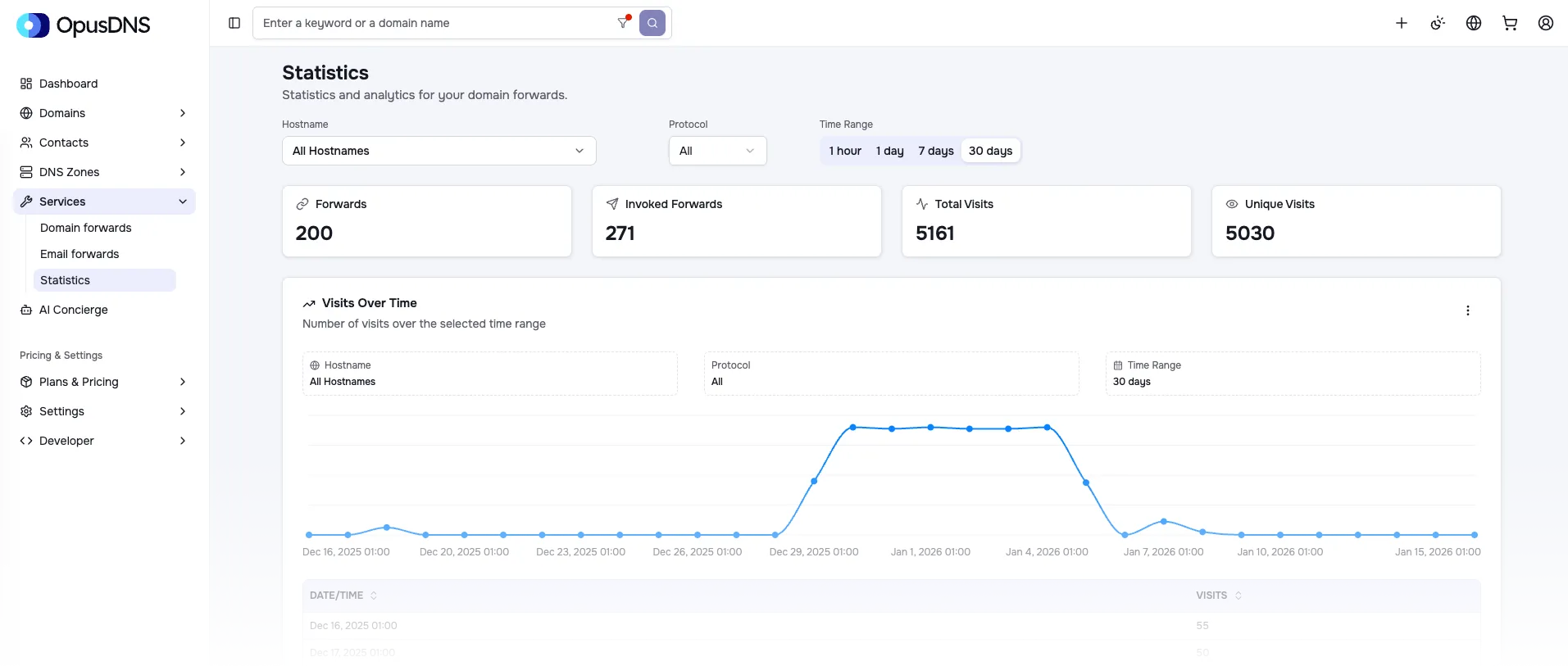
OpusDNS Dashboard showing the Domain Statistics
THE API-FIRST REDIRECT SERVICE

Domain Forwards (HTTPS)

Forward domains, subdomains and single paths to any destination, without infrastructure headaches. We replace Nginx configs and cron jobs with a zero-maintenance cloud engine that creates and protects the DNS records each forward needs.
Zero-Config HTTPS
Every redirect automatically receives a TLS 1.3 certificate from Let's Encrypt, issued and renewed without manual intervention. No "Not Secure" warnings, and a Qualys 'A' Rating.
Precision Routing
Use the full suite of status codes to signal exact intent to search engines: 301 or 308 for permanent moves, 302 or 307 for temporary ones. 307 and 308 also keep the request method for forms and API calls.
Advanced Logic
Control complex patterns with Regex and wildcards, preserve URL paths (Path Forwards) and pass query parameters seamlessly to the destination. Each hostname gets separate rules for HTTP and HTTPS visitors.
DATA OVER GUT FEELING

Domain Forwarding Statistics

Turn "fire and forget" redirects into measurable data points. See total and unique visits for any time range from one hour to one year, hide bot traffic and export the data as CSV.
Traffic Trends
Instantly spot growth, identify unused domains, or monitor peaks during campaigns, with total and unique visits over time.
Audience Insights
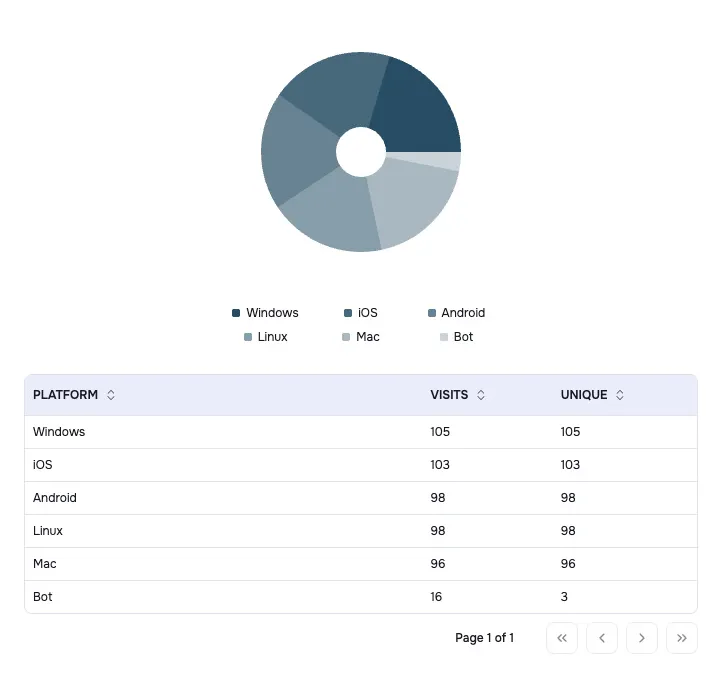
Analyze visitors by origin (geo-location), referrer, browser, operating system and user agent.
Subdomain Segmentation
See exactly which subdomains and paths are requested and which status codes were returned, especially when using Wildcard Forwards.
SERVERLESS EMAIL INFRASTRUCTURE

Email Forwarding for Your Domains

Decouple your domain identity from mailbox hosting. Create professional aliases like support@ or team@ and route them to existing inboxes (Gmail, Outlook, etc.) without running a mail server.
Privacy & Speed
Average forwarding time is under 5 seconds. We do not store email content (Privacy by Design), because your data belongs to you.
Flexible Routing
Use Catch-All for test environments and SaaS platforms, or distribute one address to multiple recipients (One-to-Many). Works for subdomains, too.
Scalability
Built for high throughput, handling traffic spikes from transactional emails without degradation.
FULL VISIBILITY

Email Logs

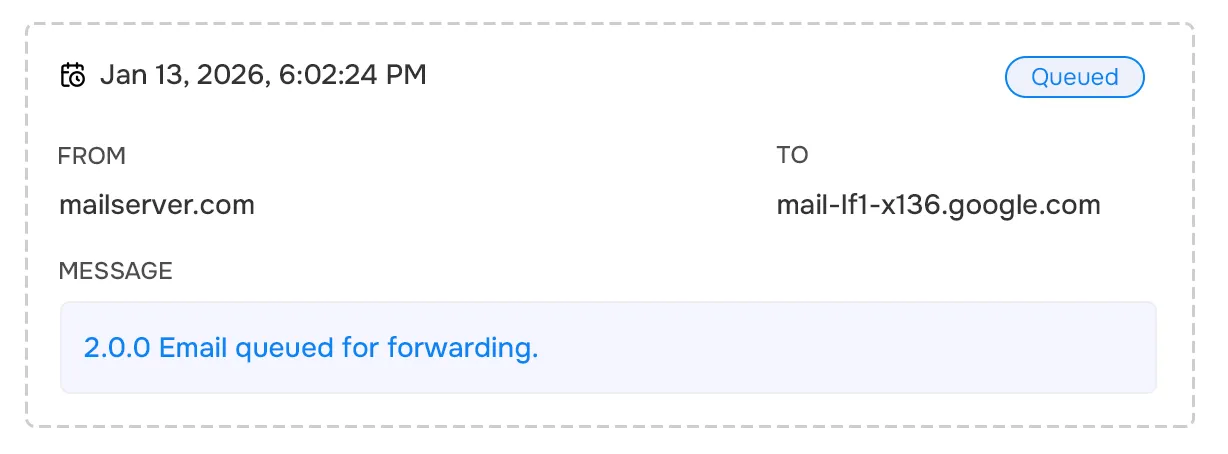
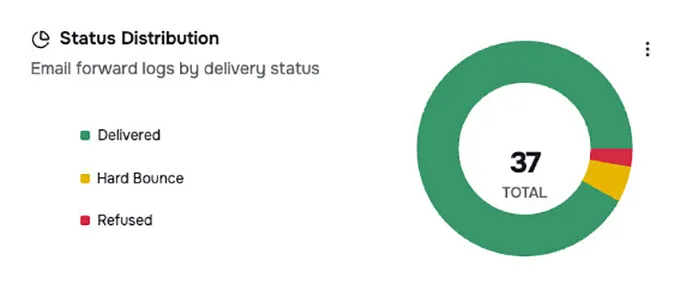
Stop guessing why an email didn't arrive. Track the journey of every message in real-time: the log lists date, sender, recipient, destination, subject and status, and shows whether a forward was successful or why the destination server rejected it.
Real-Time Status
Instantly see if emails were delivered, queued, bounced (soft or hard) or refused.
SMTP Debugging
We expose the raw response codes from the receiving server (e.g., Gmail or Outlook) so you can identify issues immediately. Refusals are often caused by strict SPF or DMARC rules at the destination.
Metadata Only
We log sender, recipient, subject and timestamps for your diagnostics. The content of your emails is never stored or read.

All Domain and Email Forwarding Features

Automatic HTTPS (TLS 1.3)
301, 302, 307, 308 Redirects
Regex Matching Support
Wildcard Subdomains
Email Aliases & Forwards
Catch-All Email Routing
Privacy by Design (No Storage)
Real-Time Analytics Dashboard
Qualys 'A' Security Rating
Path Forwards
Query String Pass-through
Full REST API Access
Bulk Import/Export
IPv6 Support
Let's Encrypt Certificates
Visitor Statistics
Bot Filter
Email Delivery Logs
Multiple Recipients
CSV and JSON Export
Bulk Jobs via API
Terraform Provider

How to Set Up Domain Forwarding

Four steps in the OpusDNS dashboard. Email forwarding works the same way under Services > Email Forwards.

Step-by-step guide in the help center

  1. Use OpusDNS nameservers

    The domain must point to the OpusDNS nameservers. If it has no DNS zone yet, OpusDNS creates one when you save the forward.

  2. Create the forward

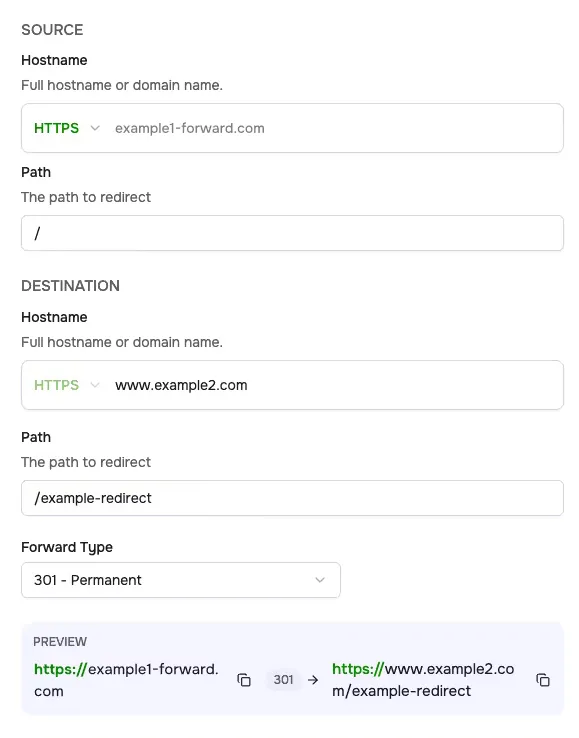
    Open Services > Domain Forwards, enter the hostname, for example example.com, and choose Exact or Wildcard for all subdomains.

  3. Add redirect rules

    Set the source protocol and path, the destination and the status code. Add one rule for HTTP and one for HTTPS visitors.

  4. Enable and check

    Save with status Enabled. HTTPS rules get their certificate automatically, and visits appear under Statistics.

Why Resellers Use OpusDNS for Domain and Email Forwarding

Security by Default

No more "Not Secure" browser warnings. We automatically provision and renew SSL certificates. Your redirects benefit from our global edge infrastructure and industry-leading A-Rated security.

Developer-First API

Redirects belong in your deployment pipeline, not in a ticket queue. Manage domains, aliases and routing rules via our full-featured REST API, as bulk jobs or with the official Terraform provider.

Full Visibility

Track the full lifecycle of every message. View SMTP response codes and specific bounce reasons for easy and instant debugging, and see visitor statistics for every domain forward.

Domain & Email Forwards at a Glance

Redirect codes
301, 302, 307 and 308
Hostnames
Exact hostname or wildcard for all subdomains (*.example.com)
Paths and query strings
Whole domain or single paths, Regex and wildcards, paths carried over (Path Forwards), query strings always passed on
HTTPS
Automatic TLS 1.3 certificates from Let's Encrypt, renewed automatically, Qualys 'A' rating
IP versions
IPv4 and IPv6
Forwarding statistics
Total and unique visits, countries, referrers, browsers, operating systems, user agents, status codes and paths, from one hour to one year, bot filter, CSV export
Email aliases
Single addresses and catch-all, several recipients per alias, also for subdomains
Email DNS records
MX and TXT records set and protected by OpusDNS
Email logs
Date, sender, recipient, destination, subject and status (delivered, queued, soft bounce, hard bounce, refused). Email content is never stored
Requirement
Domain on the OpusDNS nameservers, DNS zone is created automatically
Automation
Dashboard, REST API, bulk jobs, Terraform provider, CSV and JSON export

Frequently Asked Questions about Domain and Email Forwarding

Didn't find your question here? Book a call with our team, and we'll answer it personally.
Hakan Ali, OpusDNSRobbie Birkner, OpusDNSMarco Hoffmann, OpusDNSMarco Huber, OpusDNS
01
What is domain forwarding?

Domain forwarding sends visitors of one domain or URL automatically to another address. Typical cases are a rebrand, several TLDs that should all lead to one main domain, or an old path that moved to a new site.

With OpusDNS you set this up per hostname, with your own rules for paths, protocols and status codes.

02
Does domain forwarding affect SEO, and which status code should I use?

A 301 redirect tells search engines that a page has moved permanently, so they pass its ranking signals to the new address. Use it for rebrands and domain moves.

Use 302 or 307 for temporary redirects, for example during a campaign. 307 and 308 keep the request method, which matters for forms and API calls.

More: redirect types and their SEO effects explained

03
Is HTTPS included for forwarded domains?

Yes. Every redirect automatically receives a TLS 1.3 certificate from Let's Encrypt, issued and renewed by OpusDNS. You never upload or renew certificates yourself.

Each hostname has separate rules for HTTP and HTTPS visitors. To reach everyone, add one rule for each protocol.

More: SSL certificates for domain forwards

04
Are paths and query strings passed on?

Yes. Query strings are always appended to the target. Paths are carried over with a wildcard: with source path /* and target path /*, example.com/shop?id=1 lands on the same path at the new domain.

You can also send every path to the start page, forward single paths such as /blog or control complex patterns with Regex. An exact path always wins over a wildcard.

05
Can I forward subdomains?

Yes. Enter the subdomain as hostname, for example shop.example.com, or create a wildcard forward for *.example.com that covers every subdomain.

The statistics show which subdomains were actually requested.

06
What do I need to set up a domain forward?

The domain must use the OpusDNS nameservers. You do not need to create a DNS zone or A and AAAA records: OpusDNS creates them when you save the forward and protects them from accidental changes.

Guide: Setting up a domain forward in the dashboard

Nameservers and zones: OpusDNS managed DNS

07
How does email forwarding work for my domain?

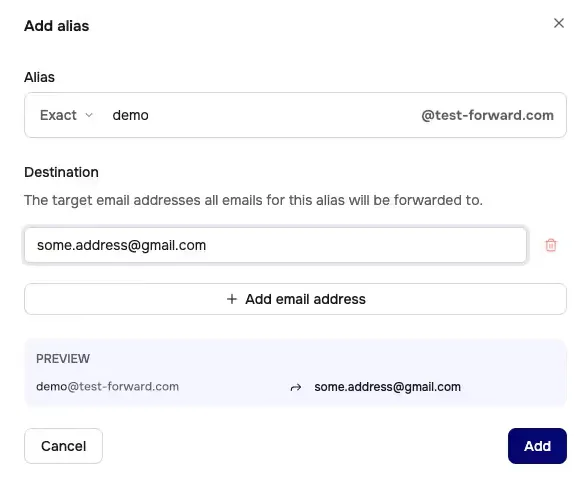
You create aliases such as info or support for your domain and enter one or more destination mailboxes. A catch-all alias receives mail for every address without its own alias.

OpusDNS sets the MX and TXT records automatically. Use forwarding only for a domain that does not receive its mail through another mail server.

Guide: Setting up email forwarding in the dashboard

08
Can I send email from a forwarded address?

No. Email forwarding receives messages and passes them on, it is not a mailbox.

Replies go out from the mail account you forward to.

09
Why was a forwarded email refused?

The receiving server decides whether it accepts a forwarded message. Strict SPF or DMARC rules of the original sender are the most common reason for a refusal.

The email log shows the status and the raw response code of the receiving server for every message, so you can see the cause right away.

10
What do the statistics and email logs show?

For domain forwards: total and unique visits over time, countries, referrers, browsers, operating systems, user agents, status codes and paths, from one hour up to one year, with an optional bot filter and CSV export.

For email forwards: every message with date, sender, recipient, destination, subject and status. The content of your emails is never stored or read.

Developer docs: domain forwarding metrics

11
Can I manage forwards via API, in bulk or with Terraform?

Yes. The OpusDNS REST API covers domain forwards, email forwards, statistics and logs. Bulk jobs create, change, enable, disable or delete many forwards in one request.

The official Terraform provider manages domain and email forwards as code, and the dashboard exports them as CSV or JSON.

More: the OpusDNS REST API

Developer docs: domain forwarding and email forwarding. Terraform: OpusDNS Terraform integration

12
Can I offer forwarding to my own customers?

Yes. Resellers and hosters connect their customer panel to the API and offer domain and email forwarding under their own name. Statistics and logs can be passed on to customers through the API as well.

For domains that should earn money instead of redirecting: Domain Parking

Get started for free

With OpusDNS, your domains are in good hands. Sign up for free now or book a call.